
Share this Post

Need help with your money or investments? Book a consultation to learn more about working together.
Am I at Risk of Having My Identity Stolen or Being a Victim of Fraud?
Identity theft and financial fraud are not abstract problems that happen to other people. They happen to people who are careful, educated, and financially stable. In fact, higher-income households are increasingly targeted precisely because there is more to steal.
The good news is that most identity theft and fraud can be prevented with a few deliberate habits.
Why This Matters More Than Ever
According to the Federal Trade Commission, consumers reported losing more than $10 billion to fraud in 2023, marking the first time that figure crossed the $10 billion threshold. That number represents real people who lost real money, often because they were caught off guard by something that seemed routine.
Cybercriminals have become sophisticated. They are no longer just sending obvious spam emails. They are crafting targeted attacks, impersonating trusted institutions, and exploiting small gaps in your digital security to cause significant damage.
The Cyber Threats Hiding in Plain Sight
Password Habits That Put You at Risk
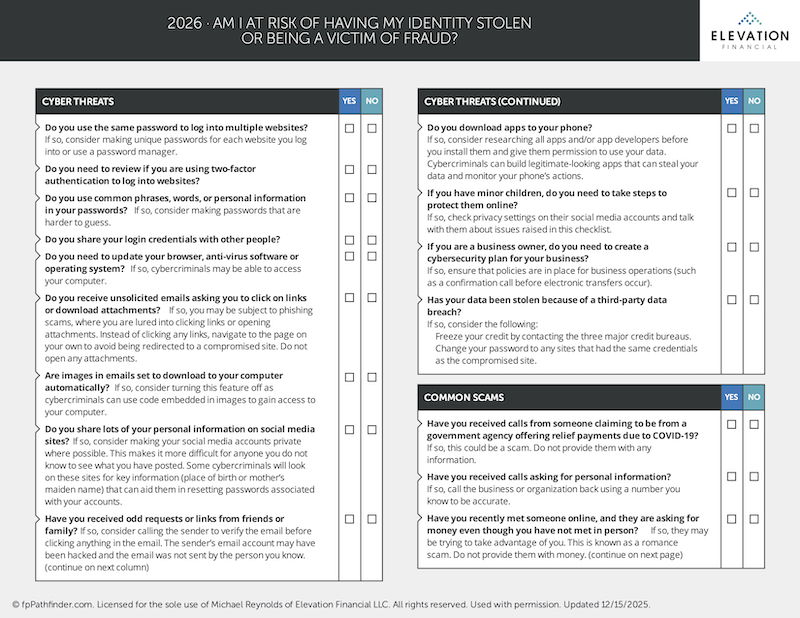
One of the most common vulnerabilities is also one of the most preventable. If you use the same password across multiple websites, a single data breach can expose every account that shares those credentials.
Strong passwords avoid common words, phrases, or personal details that could be guessed or found on social media. If managing unique passwords for every account feels unmanageable, a reputable password manager can handle that for you.
Two-factor authentication (2FA) is another layer that significantly reduces your risk. Even if a criminal gets your password, they still cannot access your account without the second verification step. Most financial institutions, email providers, and major platforms now offer this feature. If you have not turned it on, do it today.
Phishing Emails and Malicious Attachments
Phishing remains one of the most effective tools in a cybercriminal's toolkit. These are emails designed to look legitimate, often appearing to come from a bank, government agency, or even someone you know. They ask you to click a link or download an attachment.
The link typically takes you to a convincing but fake website built to capture your login credentials. The attachment may install malware on your device.
The safest approach is to never click links in unsolicited emails. If you receive an email from your bank asking you to verify your account, close the email and go directly to your bank's website by typing the address yourself.
One detail most people overlook: email images. If your email client is set to automatically download images, cybercriminals can embed tracking code in those images to get access to your device. Turning off automatic image downloading in your email settings adds a layer of protection.
Social Media Oversharing
Cybercriminals routinely scan social media profiles to gather information that helps them reset passwords or answer security questions. Your birthplace, your mother's maiden name, the name of your first pet, your high school mascot, all of these frequently appear in social media posts and are commonly used as security question answers.
Consider making your social media profiles private, and be careful about what personal details you post publicly.
Mobile Apps and Device Security
Apps are another underappreciated vulnerability. Cybercriminals build apps that appear legitimate but are designed to harvest your data or monitor your device's activity. Before installing any app, research the developer and review what permissions the app is requesting.
Keeping your browser, antivirus software, and operating system updated is also helpful. Many updates exist specifically to patch security vulnerabilities. Delaying them gives criminals more time to exploit those gaps.
Common Scams You Need to Recognize
Scams have become alarmingly convincing. Here are the ones most likely to target you.
Government Agency Impersonation
Calls claiming to be from the IRS, Social Security Administration, or Medicare are among the most reported scams in the country. These callers often create urgency, threatening legal action or claiming your benefits are at risk unless you provide information immediately.
A few things you need to know: The IRS does not contact taxpayers by phone, email, or text to request personal or financial information. If you receive a call like this, hang up. If you're not sure if the concern is real, call the agency directly using a number from their official website.
The Social Security Administration scam typically involves someone claiming your Social Security number has been compromised or suspended. The Medicare scam involves someone asking you to confirm your Medicare number to keep coverage active. Neither of these agencies will ask for sensitive information over an unsolicited call.
The Grandparent Scam
This scam specifically targets older adults. A caller claims to be a grandchild in trouble, typically saying they have been arrested or are in a medical emergency and need money wired immediately. The urgency is designed to prevent you from stopping to verify.
If you ever receive a call like this, do not send money until you have independently confirmed the caller's identity by reaching out to other family members directly.
Romance Scams
The FTC reported that romance scams cost Americans $1.14 billion in 2023, making it one of the most financially damaging fraud categories. These scams involve someone building what appears to be a genuine relationship online over weeks or months, then eventually asking for money.
If you have met someone online who has never agreed to meet in person but is asking you for money, that is a significant warning sign.
Sweepstakes and Lottery Scams
If you receive a notification that you have won a prize you never entered, be skeptical. These scams typically require you to pay a fee upfront to claim your winnings. Legitimate sweepstakes do not work this way.
Spearphishing
This is a more targeted version of phishing. A spearphishing email may include your actual username or password in the subject line, making it appear that the criminal has access to all of your accounts. In reality, they likely obtained those credentials from a single compromised website. The goal is to frighten you into paying a ransom or clicking a link.
If you receive an email like this, do not engage with it. Change the password associated with the compromised site and check whether the same credentials were used elsewhere.
Bank Impersonation Calls
Criminals will sometimes call pretending to be from your bank, claiming there has been suspicious activity on your account and that you need to verify your information or transfer your funds to a "safe" account. Your bank will not ask you to do this.
If you receive a call like this, hang up and call your bank directly using the number on the back of your debit or credit card.
What to Do If Your Data Has Been Compromised
If you discover that your personal information has been exposed in a data breach or that you have been a victim of fraud, act quickly.
First, contact any affected financial institutions immediately to report the fraud and limit further exposure. Then freeze your credit with all three major credit bureaus: Equifax, Experian, and TransUnion. A credit freeze prevents new accounts from being opened in your name, and it is free.
File a report with your local police department and with the Federal Trade Commission at IdentityTheft.gov. The FTC's website also walks you through a personalized recovery plan based on what happened.
Additional Protections to Consider
Virtual Private Networks (VPNs)
A VPN encrypts your internet connection and masks your IP address, making it significantly harder for third parties to monitor your online activity. This is especially valuable when you are using public Wi-Fi networks, which are often unsecured.
Identity Theft Protection Services
Identity theft protection services monitor your credit reports, watch for new account openings in your name, and alert you to suspicious activity. These can be a useful supplement to the steps you take on your own.
Identity Theft Insurance
You may already have some coverage here. Many homeowners and auto insurance policies include identity theft protection. Credit card companies also typically cap your liability for fraudulent charges at $50. Before purchasing a standalone policy, check what you already have so you are not paying for duplicate coverage.
Business Owners Have Additional Responsibilities
If you run a business, your exposure extends beyond your personal finances. A cybersecurity plan for your business is not optional at this point. This includes policies around electronic transfers, employee access to sensitive data, and procedures for verifying unusual requests. One practical safeguard: require a confirmation phone call before any electronic transfer is processed. This simple step has prevented many instances of business email compromise fraud.
Children
If you have minor children, their digital safety is worth addressing as well. Reviewing privacy settings on their social media accounts and having an open conversation about online risks is a reasonable starting point.
Stay Vigilant
Managing your finances well means protecting them on every front, not just making good investment decisions. Cybersecurity and fraud prevention are as much a part of your financial plan as your retirement accounts or your estate documents.
Frequently Asked Questions
Q: What is the first thing I should do if I think my identity has been stolen?
Contact your financial institutions immediately to flag the issue and prevent further unauthorized transactions. Then freeze your credit with Equifax, Experian, and TransUnion. From there, file a report with the FTC at IdentityTheft.gov, which will generate a personalized recovery plan.
Q: How do I freeze my credit and does it cost anything?
You can freeze your credit for free by contacting each of the three major bureaus directly through their websites. You will create a PIN or password to lift the freeze when you need to apply for new credit. The freeze stays in place until you remove it.
Q: Is a password manager safe to use?
Reputable password managers, such as 1Password, Bitwarden, or Dashlane, use strong encryption and are widely considered a safer option than reusing passwords across sites. No system is completely risk-free, but the risk of reusing passwords across multiple accounts is substantially higher.
Q: How do I know if an email is a phishing attempt?
Common signs include a sender address that does not match the organization it claims to be from, urgent language pushing you to act immediately, requests for login credentials or financial information, and links that do not match the organization's actual domain when you hover over them. When in doubt, go directly to the website rather than clicking any link in the email.
Q: Can my children's identities be stolen?
Yes. Children are actually attractive targets for identity thieves because their Social Security numbers are clean and the fraud may go undetected for years. Monitoring your child's credit and placing a freeze on their credit file can prevent someone from opening accounts in their name.
Q: What is two-factor authentication and do I really need it?
Two-factor authentication requires a second form of verification beyond your password, typically a code sent to your phone or generated by an app. It makes it substantially harder for someone to access your accounts even if they have your password. For financial accounts especially, it is strongly recommended.
Q: Should I buy identity theft insurance?
Check your existing coverage first. Many homeowners and auto insurance policies already include some form of identity theft protection. Credit card companies also limit your liability on fraudulent charges. If you find gaps in your coverage, a standalone policy or identity theft protection service may be worth considering.